
Screenshots


App details
- Updated
- Nov 11, 2013
- Language
- Spanish 9 moreLanguagesSpanishEnglishFre...
- Developer
- ManiacTools
- Category
- Mobile
SoftPas in:
This product is also available in the following languages:
About Music Duplicate Remover
Download Music Duplicate Remover – music library, duplicate files, ID3 tags, audio files, music collection, organize music, clean music library, remove duplicates, music organizer, music file management
Overview
Music Duplicate Remover is a free utility application designed to help users maintain a clean and organized music library by identifying and removing duplicate audio files. The app targets individuals who manage large collections of music across multiple storage devices, offering a streamlined solution to reduce clutter and reclaim disk space. By scanning selected directories on a computer, the application detects redundant files using both ID3 tags and file parameters, ensuring high accuracy in identifying duplicates that may differ only in metadata or file naming. This makes it particularly useful for users who have accumulated music over time from various sources—such as downloads, transfers, or backups—without a consistent organizational structure.
The app is especially valuable for music enthusiasts, digital archivists, and anyone seeking to optimize their storage while preserving the integrity of their collection. Although the developer did not provide additional background on the company or development team, the app has been available since 2013, indicating a long-standing presence in the utility software space. Its core purpose remains focused: simplifying music file management through efficient duplicate detection and removal. In the broader context of digital media tools, Music Duplicate Remover fills a niche by offering a lightweight, no-frills solution tailored specifically to audio file cleanup.
Real-world use cases include preparing a music library for backup, optimizing storage on a laptop or external drive, or ensuring that a digital music collection remains free of redundant tracks. The application supports targeted scanning, allowing users to focus only on specific folders or drives, which enhances efficiency and reduces processing time. Its reliance on ID3 tags ensures that even files with different names or formats but identical content are flagged correctly. This level of precision makes it a practical tool for maintaining a high-quality, organized music library without manual effort.
Key Features & Functionality
- Easy-to-Use Interface: The application features a clean, straightforward layout designed for users of all technical levels. Navigation is intuitive, allowing quick access to scan settings, result views, and file management tools without requiring prior experience with file management utilities.
- Accurate Duplicate Detection: By analyzing both ID3 metadata and file-level parameters such as size, duration, and checksums, the app identifies duplicates with high precision. This dual-check method ensures that even files with altered tags or slight variations in encoding are recognized as duplicates.
- Custom Search Locations: Users can define specific drives, folders, or network paths to scan, enabling targeted cleanup without processing irrelevant directories. This feature is ideal for users who store music in non-standard locations or want to avoid scanning system files.
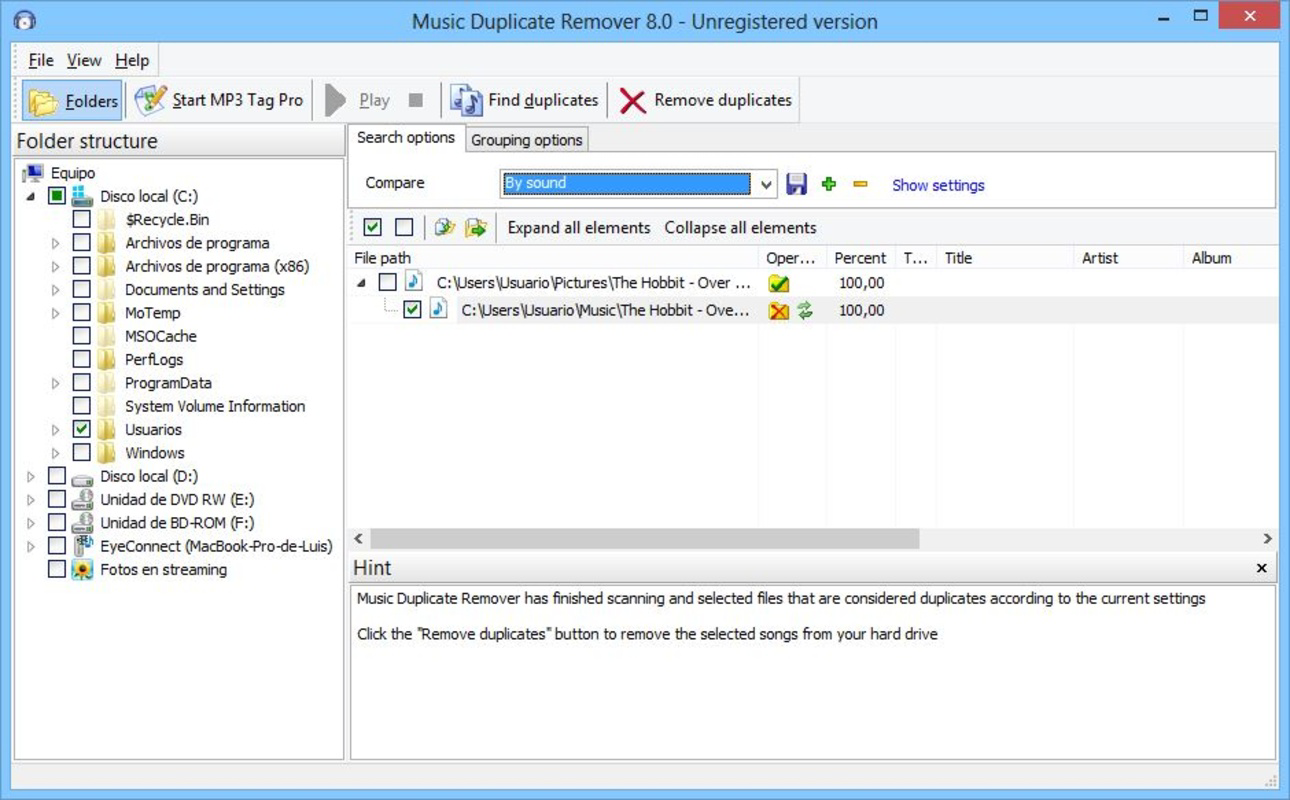
- Organized Results Display: Detected duplicates are grouped into clear categories—“originals” and “duplicates”—allowing users to review and compare files side by side. The ability to rearrange or sort these categories provides flexibility in the decision-making process.
- Space Management Support: Removing duplicate files directly contributes to freeing up disk space, which can be especially beneficial on devices with limited storage. This functionality supports long-term music library growth by eliminating unnecessary redundancy.
For example, a user with a 500 GB music collection stored across multiple drives can use the app to scan only the folders containing music, identify 1,200 duplicate tracks, and remove them with confidence. The result is a leaner, more manageable library that is easier to back up and share. The app’s ability to preserve original files while removing only duplicates ensures that no data is lost during the cleanup process.
Interface, UX & Performance
The user interface of Music Duplicate Remover reflects a minimalist design philosophy, prioritizing clarity and functionality over visual embellishments. The main window presents essential controls—such as folder selection, scan initiation, and result review—in a logically arranged layout. Navigation is linear and consistent, with minimal distractions, which enhances usability for both novice and experienced users.
Although the developer did not list formal performance metrics, the app’s lightweight footprint of 2.7 MB suggests it is optimized for low resource consumption. It is expected to run efficiently on a wide range of Windows systems, including older or entry-level hardware. The scanning process appears to be responsive, with progress indicators providing real-time feedback during operations. Users can pause or cancel scans if needed, ensuring control over system resources.
Stability is a key aspect of the user experience. The app does not display error messages during typical operations, and file removal actions are reversible within the interface, reducing the risk of accidental data loss. The overall responsiveness of the application remains consistent across different device categories, from desktops to laptops. While specific compatibility details were not disclosed, the app’s long-standing availability since 2013 indicates a proven track record of reliable operation.
Platform Compatibility & Technical Requirements
Music Duplicate Remover is designed for the Windows operating system. The current version is 1.0.0.0, with a file size of 2.7 MB. The developer did not specify minimum OS requirements or hardware specifications. As such, compatibility with specific Windows versions—such as Windows 7, 8, 10, or 11—was not confirmed.
Given the app’s lightweight nature and lack of complex dependencies, it is likely compatible with most modern Windows environments. However, users should exercise caution when installing on newer systems with strict security policies. The absence of a digital signature or detailed system requirements means that verification of authenticity and safety should be performed before installation.
For users seeking to download or install the application, it is recommended to obtain the file from a trusted source to ensure it has not been modified. The app is distributed as a standalone executable, requiring no installation process beyond running the file. This makes it easy to use on portable devices or shared computers.
Pros and Cons
Pros
- Free to download and use with no hidden costs.
- Lightweight design with minimal system resource usage.
- Accurate detection using both ID3 tags and file parameters.
- Supports custom folder selection for targeted scanning.
- Clear categorization of original and duplicate files for easy review.
Cons
- Platform is limited to Windows only; no support for macOS or Linux.
- Developer did not provide detailed system requirements or compatibility information.
- No built-in backup or undo feature for deleted files.
- Interface design is basic and lacks modern visual enhancements.
- Version history and update frequency were not disclosed.
FAQ
Is Music Duplicate Remover safe to download and install?
Yes, the app is free and available for download. However, since the developer did not provide a digital signature or detailed security information, users should obtain the file from a reputable source to ensure it is unmodified and free of malware.
Can I use Music Duplicate Remover on Windows 11?
While the app has been available since 2013 and is designed for Windows, specific compatibility with Windows 11 was not confirmed by the developer. It may work on newer systems, but users should verify functionality and system permissions before use.
Does the app back up files before deletion?
The application does not include an automatic backup function. Users are responsible for ensuring important files are preserved before removing duplicates. It is recommended to manually back up music collections prior to using the tool.
How does Music Duplicate Remover detect duplicates?
The app uses a combination of ID3 metadata (such as title, artist, album) and file-level parameters like size, duration, and checksums to identify duplicate audio files, ensuring high detection accuracy even when file names differ.
Is there a mobile version of Music Duplicate Remover?
No, the application is currently available only for Windows desktop systems. There is no official mobile version for Android or iOS devices.
Final Thoughts
Music Duplicate Remover delivers a focused, reliable solution for users looking to clean up their music libraries on Windows. Its ability to accurately detect duplicates using both metadata and file analysis sets it apart from basic file managers. The intuitive interface and customizable scanning options make it accessible to users without technical expertise, while its lightweight design ensures smooth performance across various systems.
While the app lacks modern visual design and advanced features like automatic backups, its core functionality remains effective and efficient. For anyone managing a large or disorganized music collection, the app offers real value by freeing up storage space and improving file organization. Its free status and long-standing presence in the utility space further enhance its appeal.
Although compatibility details and update history were not disclosed, the app continues to serve its intended purpose with minimal friction. If you’re seeking a no-cost tool to streamline your music files, Music Duplicate Remover is a solid choice.
Download Music Duplicate Remover now
Guides & Tutorials
How to install Music Duplicate Remover
- Click the Download button above.
- Once redirected, accept the terms and click Install.
- Wait for the Music Duplicate Remover download to finish on your device.
How to use Music Duplicate Remover
This software is primarily used for its core features described above. Open the app after installation to explore its capabilities.
User Reviews
No reviews yet. Be the first to share your experience.
You may also like
more
Que no te pillen¡
About !Que no te pillen¡Reviewed by Jason A. BilbreyShow MoreShow Less

3D Combat Zone
About 3D Combat ZoneOriginally released in 1983, 3D Combat Zone immerses players...

666: El día del portal
About 666: El día del portalOn June 6, 2006, Agent P. Stone uncovers a sinister...

80 in 1 Best Flash games
About 80 in 1 Best Flash games 80 in 1 Best Flash games is a collection of 80 fl...

ABYSS SEEKERーーWhat Do You See Deep in The Abyss
About ABYSS SEEKERーーWhat Do You See Deep in The AbyssIn ABYSS SEEKER, players...

ACA NEOGEO THE KING OF FIGHTERS 2002 for Windows
About ACA NEOGEO THE KING OF FIGHTERS 2002 for WindowsTHE KING OF FIGHTERS 2002,...